Hawei

Say Hi.


  • Home

  • About

  • Tags

  • Categories

  • Archives

总结响应式.md

Posted on 2020-04-12 | In vue

最近在重新梳理知识点,Vue写了那么久, 是时候给自己一个交代了.也不能每天画好玩的UI对吧.

从题目开始, 这篇文章的前置知识点有

  • Object.defineProperty
  • 响应式

Object.defineProperty

关于第一个Object.defineProperty我已经给了链接.

这个方法可以让我们自定义对象上属性的属性.

有点绕啊.举个例子

1
2
3
4
5
6
7
8
9
10
11
12
13
14
15
16
17
18
19
20
21
22
23
24
25
26
27
28
29
30
31
32
33
34
35
36
37
38
39
40
41
42
var obj = {
a: 1,
b: 2
}
Object.defineProperty(obj, 'a', {
// 枚举----你使用for-in/Object.key()的时候会影响到
enumerable: false,
// 可配置---是否可以修改属性的属性, 这就是这个对象里所有的内容
configurable: false,
// 可写---是否可以在这个对象上修改value,比如常规的赋值,删除操作
writable: false,
// 值---你用点运算符操作的时候,读取到的值
value: "static"
})

obj.a // 'static'
Object.keys(obj) // []
for(let i in obj) {console.log(i)} // undefined
obj.a = 1
obj.a // 'static'
Object.defineProperty(obj, 'a', {
// 枚举----你使用for-in/Object.key()的时候会影响到
enumerable: false,
// 可配置---是否可以修改属性的属性, 这就是这个对象里所有的内容
configurable: false,
// 可写---是否可以在这个对象上修改value,比如常规的赋值,删除操作
writable: false,
// 值---你用点运算符操作的时候,读取到的值
value: "1"
}) // trow Error
var unknow = obj.b
Object.defineProperty(obj, 'b', {
// 当然我们也可以重写它的默认的get/set行为
get() {
return unknow * 4
},
set(value) {
unknow = value
}
})
obj.b // 8
obj.b = 2 // 2

这个方法相关的我们就复习完了.

响应式

先说定义, 通俗一点说的响应式是指, 当数据a变化了, 与这个数据a相关的操作都会更新. 来看个非响应式的例子可能会好理解一点.(反向操作)

1
2
3
4
5
let a = 1;
let b = a * 5;

a = 2;
b; // 5 我们期望, 如果a改变,那么基于a的计算都可以同步, 我们希望b为10

那么怎么做到这一点?

我们监测变量a, 如果a触发了get操作, 那么很可能,进行了依赖性的运算, 在这个例子里就是

1
let b = a * 5

在这里b的计算依赖于a.噢, 所以,在这个地方我们获取了a, 并进行了计算, 那我就拿个小本子把这个操作记下来.

如果, 变量a触发了set操作, 也就是赋值操作, 那么我们就要拿出小本子, 在把上面记下来的依赖重新执行一遍就好.

其实这就是响应式的原理.

  1. 收集依赖
  2. 侦测变化
  3. 触发更新

之前我们也提到了, defineProperty我们通过get方法知道什么时候收集依赖, 通过set方法知道什么时候发生了变化, 触发更新.

接下来就是实操了.

把对象所有的属性转换为get/set

defineProperty不像proxy,它只能单个的去监听对象上的属性,而proxy这个小玩具.就很有意思.

那么请听题: 假设你有一个对象(你在骗自己), 你希望有一个函数, 这个函数把这个对象上所有的属性转换为可监测get/set。如果触发了get需要在控制台输出

1
`get: ${key}: ${value}`

一定要自己试一下.以下是答案

1
2
3
4
5
6
7
8
9
10
11
12
13
14
15
16
17
18
19
20
21
22
23
24
25
26
27
28
const transform = (obj, i) => {
var unKnow = obj[i]
Object.defineProperty(obj, i, {
get() {
console.log(`getting"${i}": ${unKnow}`, unKnow)
return unKnow
},
set(value) {
console.log(`setting"${i}" to: ${value}`)
unKnow = value
}
})
}

function convert (obj) {
// Implement this!
for (let i in obj) {
transform(obj, i)
}
}

// test
let a = {
a: 1,
b: 2
}

convert(a)

Vue中的依赖跟踪

data

每个vue的实例都会有一个watcher对象,这个对象中提供增加依赖和触发依赖更新的方法。

在getter操作时把依赖传入Watcher, 而在单个属性发生改变,也就是set的时候触发依赖更新notify, 继而Watcher执行视图更新操作。

注意, 在这里用了设计模式中的发布-订阅模式

每个vue实例就是订阅者, 这些订阅者的更新事件都放到watcher对象里管理。当我们增加一个依赖项的时候把依赖项放入订阅队列, 然后在每次更新的时候区触发对应的事件。完成更新

来看代码

1
2
3
4
5
6
7
8
9
10
11
12
13
14
15
16
17
18
19
20
21
22
23
24
25
26
27
28
29
30
31
32
33
34
35
36
37
// 一个依赖项就是一个watch
// watch 中的subscibers是订阅者的一个队列,里面存放每个依赖事件
// 方法:
// depend: 为该属性增加依赖项
// notify: 数据更新时通知依赖项更新
// 2. 依赖项
class Dep {
constructor() {
this.taskList = new Set()
}

getDep() {
if (activeUpdate) {
// 为啥这个要使用外部变量不用传参的方式传进来呢?
// 依赖收集的时候,在get方法内部, 在内部我们怎么访问到
this.taskList.add(activeUpdate)
}
}

notify() {
this.taskList.forEach(item => item())
}
}

let activeUpdate = null
// 上面的class部分简单易懂, 不做赘述
// 这个函数一定要明白
function autorun (update) {
const wrappedUpdate = () => {
activeUpdate = wrappedUpdate
update()
// update里面触发数据监听, 会先触发get, 而我们在get里做依赖收集,此时activeUpdate存的是 整个函数体
// 通过这种方式完成了依赖收集, 并且把activeUpdate置空,为下次使用做准备
activeUpdate = null
}
wrappedUpdate()
}

使用get/set方法与依赖收集更新结合, 完成小型的观察者模式

这个可以先自己实现后再往下看.啊?没时间啊?没关系啊, 就…就点收藏就行了啊.

1
2
3
4
5
6
7
8
9
10
11
12
13
14
15
16
17
18
19
20
21
22
23
24
25
26
27
28
29
30
31
32
33
34
35
36
37
38
39
40
41
42
43
44
45
46
47
48
49
50
51
52
53
54
55
56
57
58
59
60
61
62
63
64
65
66
67
68
69
70
71
72
73
74
75
76
77
// 2. 依赖项
class Dep {
constructor() {
this.taskList = new Set()
}

getDep() {
if (activeUpdate) {
// 为啥这个要使用外部变量不用传参的方式传进来呢?
// 依赖收集的时候,在get方法内部, 在内部我们怎么访问到
this.taskList.add(activeUpdate)
}
}

notify() {
this.taskList.forEach(item => item())
}
}

let activeUpdate = null

function autorun (update) {
const wrappedUpdate = () => {
activeUpdate = wrappedUpdate // 这个就是一个依赖, 注意,这个其实是是外层函数, 在dep类里, 我们会把它存进taskList, 供通知的时候使用
update() // update里面要执行一个依赖收集
activeUpdate = null
}
wrappedUpdate()
}

// 3. 结合数据变化检测 + 依赖项收集
function scan (obj) {
Object.keys(obj).forEach(key => {
let internalValue = obj[key]
// 在进行响应式的同时初始化依赖项实例, 之后再对应的getter/setter方法中形成闭包, 把依赖状态持久化
const dep = new Dep()
Object.defineProperty(obj, key, {
get () {
// 每次进行get方法的时候, 都进行一次依赖收集
dep.getDep()
return internalValue
},
set (newVal) {
// 检测值是否改变, 如果没有改变, 那么不做处理(为了性能)
const changed = internalValue !== newVal
internalValue = newVal
// 如果发生了改变, 那么在依赖class触发依赖项的更新
if (changed) {
dep.notify()
}
}
})
})
return obj
}


var state = {
count: 0
}

scan(state)

autorun(() => {
// 在state.count就触发了getter操作, 继而触发了依赖收集
a = state.count // 0
})

// 对state.count = 1触发了setter操作, 继而触发了依赖更新
state.count = 1

a // 1

state.count = 2

a // 2

看懂的时候觉得真的, 尤雨溪太他妈帅了。这东西写得好精巧啊。

总结

重新理一下,如果你要做到响应式.那么你应该有什么?

  1. 你要有监测机制, 因为如果你不知道什么时候改变,那么你就不会知道啥时候响应
  2. 你要有依赖收集, 因为你不能预知依赖到底有多少, 那么你就得管理依赖项
  3. 你要有响应机制, 你检测到了更新, 继而触发依赖收集, 下一步就是在数据更新的时候, 根据收集到的依赖, 去触发响应, 更新依赖项

以上这三点, 的实现分别为:

  • 检测机制用 get/set方法进行检测, 作为依赖收集, 触发响应的事件分发点
  • 依赖收集和响应机制我们使用dep这个类来完成, 供检测机制调用
  • 使用autorun包裹存在依赖的操作, 并生成引用, 供dep类的getDep依赖收

完结, 撒花, 满地打滚求点赞.
Grid布局

Posted on 2019-04-07 | In frontendMaster

Grid布局

为什么是Grid?

  1. 现在grid已经成为css的规范,这是未来的布局方式
  2. 在html中不会再有row(我们从一维布局走到了二维世界)
  3. 建议: flexbox 用在UI元素层面,Grid布局应用在页面布局上

兼容性

IE11以下, Edge15以下, IEmobile10以下 部分支持。

https://caniuse.com/#search=grid

兼容性解决方案:

1. 使用polyfill
2. 使用@supports (but前提是你的浏览器支持@supports)

语法:

  1. 定义grid容器
1
2
3
4
.box {
display: grid;
grid-gap: 20px; /* grid网格之间的间隙 */
}
  1. 给cell布局

    感觉啊, css的发展越来越语义化, 这个cell占的位置都可以直接读出来了。太强大了。

    grid-column: 1/2; /* 我希望这个元素占这个容器的宽度是从第一列到第二列的宽度 = = 还有是这个关系[1, 2) */

1
2
3
4
5
6
7
8
9
10
11
12
13
14
15

.col-1 {
grid-column: 1/2;
}

.col-2 {
grid-column: 2/3;
}
.col-3 {
grid-column: 3/4;
}

.col-4 {
grid-column: 4/5;
}

响应式图像

Posted on 2019-04-07 | In frontendMaster

响应式图像

图片大小会影响性能。在不同的设备上显示不同大小的图片就是响应式图片。根据设备的大小来选择要显示哪张图片。

主要注意两个属性: media type

media 属性

这个属性内放媒体查询语句,如果结果为false,那么跳过

1
2
3
4
<picture>
<source srcset="mdn-logo-wide.png" media="(min-width: 600px)">
<img src="mdn-logo-narrow.png" alt="MDN">
</picture>

type属性

指定资源类型,如果支持则用这个类型,如果不支持则跳过

1
2
3
4
<picture>
<source srcset="mdn-logo.svg" type="image/svg+xml">
<img src="mdn-logo.png" alt="MDN">
</picture>

兼容性: 不支持IE

MDN页面

https://developer.mozilla.org/zh-CN/docs/Web/HTML/Element/picture

Vue响应式原理-get/set

Posted on 2019-04-07 | In frontendMaster

vue响应式原理—–get/set

什么是响应式?

要说什么是响应式, 那么就要知道什么不是响应式,看个例子

1
2
3
4
5
let a = 1;
let b = a * 5;

a = 2;
b; // 5 我们期望, 如果a改变,那么基于a的计算都可以同步, 我们希望b为10

这里就要提出一个属性Object.defineProperty()

使用方法为:

1
2
3
4
5
6
7
8
9
10
11
12
13
14
15
16
17
18
19
20
21
22
23
24
25
26
27
28
29
30
31
32
33
34
35
36
37
38
39
40
41
42
43
44
45
46
47
48
49
50
Object.defineProperty(obj, 'keyName', { 
// 这里就是配置obj这个对象的keyName这个属性的地方
get () {

},
set() {

}
})

// 首先是四个属性值的属性
// enumerable : 是否可枚举 // [].length
// writeable : 是否可写 // a.prop1 = 1;
// configurable : 是否可配置
// value : 我获取值时返回的value

// 两个方法: get/set
// 挑战1: 我需要一个fn,输入obj把里面的每一个属性都转换为可响应式,配上get/set方法
obj = {
a: 1, // get: "a is 1" set: "a is 2"
b: 1 // "b is 1"
}
const transform = (obj, i) => {
var unKnow = obj[i]
Object.defineProperty(obj, i, {
get() {
console.log(`getting key "${i}": ${unKnow}`, unKnow)
return unKnow
},
set(value) {
console.log(`setting key "${i}" to: ${value}`)
unKnow = value
}
})
}

function convert (obj) {
// Implement this!
for (let i in obj) {
transform(obj, i)
}
}

// test
let a = {
a: 1,
b: 2
}

convert(a)

依赖跟踪

data

每个vue的实例都会有一个watcher对象,这个对象中提供提供增加依赖和发布依赖的方法。增加依赖在于getter部分把当数据更新的操作增加, 而在单个属性发生改变,也就是set的时候触发notify, 执行更新操作。在这里用了设计模式中的发布-订阅模式

每个vue实例就是我们的订阅者, 这些订阅者的更新事件都放到watcher对象里区管理。当我们增加一个依赖项的时候把依赖项放入订阅队列, 然后在每次更新的时候区触发对应的事件。完成更新。

1
2
3
4
5
6
7
8
9
10
11
12
13
14
15
16
17
18
19
20
21
22
23
24
25
26
27
28
29
30
31
32
33
// 一个依赖项就是一个watch
// watch 中的subscibers是订阅者的一个队列,里面存放每个依赖事件
// 方法:
// depend: 为该属性增加依赖项
// notify: 数据更新时通知依赖项更新
window.Dep = class Dep {
constructor () {
// 订阅队列
this.subscribers = new Set()
// new Set([1, 2, 3, 1])
}

depend () {
if (activeUpdate) {
this.subscribers.add(activeUpdate)
}
}

notify () {
this.subscribers.forEach(sub => sub())
}
}

let activeUpdate = null

function autorun (update) {
const wrappedUpdate = () => {
activeUpdate = wrappedUpdate // 这个就是一个依赖, 注意,这个其实是是外层函数
update() // update里面要执行一个依赖收集
activeUpdate = null
}
wrappedUpdate()
}

结合get/set与依赖跟踪,完成一个小型观察者对象

1
2
3
4
5
6
7
8
9
10
11
12
13
14
15
16
17
18
19
20
21
22
23
24
25
26
27
28
29
30
31
32
33
34
35
36
37
38
39
40
41
42
43
44
45
46
47
48
49
50
51
52
53
54
55
56
57
58
59
60
61
62
63
64
65
66
67
68
69
70
71
72
73
74
75
76
77
78
79
80
class Dep {
constructor () {
this.subscribers = new Set()
}

depend () {
if (activeUpdate) {
this.subscribers.add(activeUpdate)
}
}

notify () {
this.subscribers.forEach(sub => sub())
}
}

// 批量对Obj的属性赋予响应式的能力
function observe (obj) {
// iterate through all properties on the object
// and convert them into getter/setters with
// Object.defineProperty()
Object.keys(obj).forEach(key => {
let internalValue = obj[key]
// each property gets a dependency instance
// 在进行响应式的同时初始化依赖项实例, 之后再对应的getter/setter方法中形成闭包, 把依赖状态持久化
const dep = new Dep()
Object.defineProperty(obj, key, {
// The getter is responsible for registering subscribers
get () {
// 每次进行get方法的时候, 都进行一次依赖收集
dep.depend()
return internalValue
},
// The setter is responsible for notifying change
set (newVal) {
// 检测值是否改变, 如果没有改变, 那么不做处理(为了性能)
const changed = internalValue !== newVal
internalValue = newVal
// triggering re-computation
// 如果发生了改变, 那么在依赖class触发依赖项的更新
if (changed) {
dep.notify()
}
}
})
})
return obj
}

let activeUpdate = null

// 这里要注意一点, 你所有的, 对依赖项相关的操作,都要以匿名函数的方式传入这个函数, 才能完成依赖的收集
function autorun (update) {
// wrap the raw update function into a "job" function that registers and
// unregisters itself as the current active job when invoked
const wrappedUpdate = () => {
activeUpdate = wrappedUpdate
update()
activeUpdate = null
}
wrappedUpdate()
}

const state = {
count: 0
}


observe(state)

autorun(() => {
// 在state.count就触发了getter操作, 继而触发了依赖收集
a = state.count // 0
})

// 对state.count = 1触发了setter操作, 继而触发了依赖更新, 真他妈天才
state.count = 1

a // 1

2019.08.16
很震撼啊,这东西写得好精巧啊.

重新理一下,如果你要做到响应式.那么你应该有什么?

  1. 你要有监测机制, 因为如果你不知道什么时候改变,那么你就不会知道啥时候响应
  2. 你要有依赖收集, 因为你不能预知依赖到底有多少, 那么你就得管理依赖项
  3. 你要有响应机制, 你检测到了更新, 继而触发依赖收集, 下一步就是在数据更新的时候, 根据收集到的依赖, 去触发响应, 更新依赖项

以上这三点, 的实现分别为:

  • 检测机制用 get/set方法进行检测, 作为依赖收集, 触发响应的事件分发点
  • 依赖收集和响应机制我们使用dep这个类来完成, 供检测机制调用
  • 使用autorun包裹存在依赖的操作, 并生成引用, 供dep依赖收集
1
2
3
4
5
6
7
8
9
10
11
12
13
14
15
16
17
18
19
20
21
22
23
24
25
26
27
28
29
30
31
32
33
34
35
36
37
38
39
40
41
42
43
44
45
46
47
48
49
50
51
52
53
54
55
56
57
58
59
60
61
62
63
64
65
66
67
68
69
70
71
72
// 1. get/set批量依赖检测
const scan = (obj) => {
for(let i in obj) {
let prop = obj[i]

Object.defineProperty(obj, i, {
get() {
console.log('get')
return prop
},
set(value) {
console.log('set')
prop = value
}
})
}
}

// 2. 依赖项
class DepObj {
constructor() {
this.taskList = new Set()
}

getDep() {
if (activeUpdate) {
// 为啥这个要使用外部变量不用传参的方式传进来呢?
// 依赖收集的时候,在get方法内部, 在内部我们怎么访问到
this.taskList.add(activeUpdate)
}
}

notify() {
this.taskList.forEach(item => item())
}
}

let activeUpdate = null

function autorun (update) {
const wrappedUpdate = () => {
activeUpdate = wrappedUpdate // 这个就是一个依赖, 注意,这个其实是是外层函数, 在dep类里, 我们会把它存进taskList, 供通知的时候使用
update() // update里面要执行一个依赖收集
activeUpdate = null
}
wrappedUpdate()
}

// 3. 结合数据变化检测 + 依赖项收集
const scan = (obj) => {
for(let i in obj) {
let prop = obj[i]
let dep = new DepObj()
Object.defineProperty(obj, i, {
get() {
console.log('get')
dep.getDep()
return prop
},
set(value) {
console.log('set')
let change = value === prop
prop = value

if(change) {
dep.notify()
}
}
})
}
return obj
}

vue表单验证插件

Posted on 2019-04-07 | In frontendMaster

表单验证

vue插件也可以用来注入全局变量.比如用户基本信息, 一些公共数据, 公告方法.

表单验证的两种方式:

1. 基于标签(html): 把验证逻辑放在html标签内, 优点是更清晰。自定义指令实现。
2. 基于model: 把验证逻辑放在js, 优点是更容易实现, 更易定制化。插件实现。

(挖坑: 用自定义指令实现一个类似的)

实现: 实现一个小型表单验证插件

  1. 先复习插件的关键点: 使用(注入/在实例中使用)/定义(install/mixin/钩子函数)
  2. 表单验证的流程
    • 设置验证函数, 配置错误信息
    • 遍历执行验证函数, 返回整体验证结果和错误信息
1
2
3
4
5
6
7
8
9
10
11
12
13
14
15
16
17
18
19
20
21
22
23
24
25
26
27
28
29
30
31
32
33
34
35
36
37
38
39
40
41
42
43
44
45
46
47
48
49
50
51
52
53
54
55
56
57
58
59
60
61
62
63
64
65
66
67
68
69
70
71
72
73
74
75
76
77
78
79
80
81
82
83
84
85
86
87
88
89
90
91
92
93
94
95
<template>
<div id="app">
<form @submit="validate">
<input v-model="text">
<br>
<input v-model="email">

<ul v-if="!$v.valid" style="color:red">
<li v-for="error in $v.errors">
{{ error }}
</li>
</ul>

<input type="submit" :disabled="!$v.valid">
</form>
</div>
</template>
<script>
const validationPlugin = {
// Implement this!
install(Vue) { // 和mixin不一样的是, 这个install的第一个参数是触发vue.use的Vue实例
Vue.mixin({
beforeCreate() { // 我不知道 为什么要在这个钩子函数?Created不行吗
// 获取到实例上的 validations
const rules = this.$options.validations

if(rules) {
// 把验证的对象$v挂载到computed钩子函数上
this.$options.computed =
Object.assign({}, this.$options.computed, {
$v () {
// 初始化验证结果与错误信息
let valid = true
const errors = []

// 遍历rules, 对每个rule进行验证
// 这里要说一点, 我们并没从dom结构上去取值, 我们是直接从state上取, 因为在data里有 text/email
// 所有我们需要的value
Object.keys(rules).map(key => {
const rule = rules[key]
// 注意:我们在data中初始化了这个值,这意味着我们在这里触发了getter, 进行了依赖收集
// 接下来每次触发setter都会执行一次
const value = this[key]

// 把value传入在validations上对应的验证函数
const result = rule.validate(value)
// 如果错误了就触发validations上对应的message函数
if(!result) {
valid = false
errors.push(rule.message(key, value))
}
})

return { // 最后,返回验证结果和队列
valid,
errors
}
}
})
}
},
})
}
}

Vue.use(validationPlugin)

const emailRE = /^(([^<>()[\]\\.,;:\s@\"]+(\.[^<>()[\]\\.,;:\s@\"]+)*)|(\".+\"))@((\[[0-9]{1,3}\.[0-9]{1,3}\.[0-9]{1,3}\.[0-9]{1,3}\])|(([a-zA-Z\-0-9]+\.)+[a-zA-Z]{2,}))$/

new Vue({
el: '#app',
data: {
text: 'foo',
email: ''
},
validations: {
text: {
validate: value => value.length >= 5,
message: (key, value) => `${key} should have a min length of 5, but got ${value.length}`
},
email: {
validate: value => emailRE.test(value),
message: key => `${key} must be a valid email`
}
},
methods: {
validate (e) {
if (!this.$v.valid) {
e.preventDefault()
alert('not valid!')
}
}
}
})
</script>

Render Function

Posted on 2019-04-07 | In vue

Render Function

渲染顺序

1. Template->render function   (compiled into)    在这一步, 相当于第一章里说的autorun, 当数据变化的时候我们会重新执行这的函数
- new virtual dom(return)  数据更新后返回新的虚拟dom树
- dom updates(diff against old virtual dom)   旧树和新树进行比较, patch最小差异部分得到即将渲染的虚拟dom树
- actual dom(applied to) 
2. virtual dom   (returns)
3. actual dom (generates)

解释:

​ 我们首先编译temlate转换为render函数

什么是虚拟dom树

先做个类比
浏览器的domAPI:

​ - 语法: document.createElement(‘div’)

​ - 返回: “[object HTMLDivElement]”

​ 虚拟dom: 本质上是一个轻量级的描述dom的一个对象.

​ 语法: vm.$createElement(‘div’)

​ 返回: { tag: ‘div’, data: { attrs: {}…..}, child: []}

dom是一个很大的对象, 所以在vue中(平常也是),我们只要操作了dom那么性能就会存在开销。

but, 和浏览器的dom对象比起来,我们创建多个虚拟dom对象, 很简单,而创建多个浏览器dom实体性能损耗更大.

我们平常使用dom的API对页面进行更新,实际操作是扔掉所有的旧节点,再次生成新dom节点.

虚拟dom最棒的一点是, 解耦了渲染步骤。我们以前渲染是跟着页面的逻辑去一部分一部分的渲染, 在这个过程中很可能出现重复和不必要的渲染。这影响了性能。但是虚拟dom, 是这样做的, 生成最初的虚拟dom树,此时并没有开始渲染,而是先进行逻辑运算,在运算完成得到最后的dom树,完成渲染(渲染过程在最后一步)。

render在响应式做了什么工作

data

我们的每一个组件都有自己的render/Data/watcher

render 往data里面取数据,此时发生了两件事:

1. 触发getter, 由于我们在getter里做了dependency collect,依赖被保存在watcher.当setter数据时,从watcher获取依赖,重新进行render(因为render在getter的时候,把依赖传入了watcher.)
2. 得到数据,进行render

JSX与模板比较

jsx与模板语法本质上都是为了描述我们的state与dom之间的关系.

1
2
3
4
5
export default {
render (h) {
return h('h', {}, [...])
}
}

区别

  • 模板: 模板语法相对于jsx更加的静态, 更多的约束的表达, 但是模板语法更易迁移。模板语法因为存在限制,我们可以对这些限制进行更深一层的优化。
  • jsx: 更加动态,更加灵活, 可以完全体现出fp编程的优势。

render function API

1
2
3
4
5
6
export default {
render (h) {
// 为什么是h, 首先解释一下h的意思, 就是createElement, 为啥不是c是因为设计的时候参照了hyperscript的API, 表示是通过js写html的方法
return h('h', {}, [...]) // arg1: 标签类型 arg2: 数据对象 arg3:
}
}
1
2
3
4
5
6
7
// exmple
h('div', 'some text')
h('div', { class: 'foo' }, 'some text')
h('div', {}, [
'some text',
h('span', 'bar')
])

使用render函数可以直接渲染组件(在router中直接使用render语法渲染组件)

1
2
3
4
5
import component from ''

h(component, {
props: {... }
})
1
2
3
4
5
6
练习1: 使用render语法渲染以下html
<div>
<h1>0</h1>
<h2>1</h2>
<h3>2</h3>
</div>

函数式render

函数式组件是指, 无状态组件,相同输入,固定输出, 不依赖外部变量。像一个处理管道。

组件需要的一切都是通过context传递

1
2
3
4
5
6
7
8
9
10
11
12
Vue.component('my-component', {
functional: true,
// Props 可选
props: {
// ...
},
// 为了弥补缺少的实例
// 提供第二个参数作为上下文
render: function (createElement, context) {
// ...
}
})

高阶组件

记忆: 高阶组件就像是高阶函数, 都是通过原子组合复用得到更抽象,功能更强的东西。

smartAvatar, 基于Avatar组件组合的高阶组件。

功能, 根据smartAvatar的props属性来决定Avatar的渲染结果

  1. 原子: Avatar低阶组件
  2. 在app这一层准备数据, props/data.url/created()
  3. 在render进行组件的渲染(计算出最后的组件应该是啥样)
1
2
3
4
5
6
7
8
9
10
11
12
13
14
15
16
17
18
19
20
21
22
23
24
25
26
27
28
29
30
31
32
33
34
35
36
37
38
39
40
41
42
43
44
45
function fetchURL (username, cb) {
setTimeout(() => {
// hard coded, bonus: exercise: make it fetch from gravatar!
cb('https://avatars3.githubusercontent.com/u/6128107?v=4&s=200')
}, 500)
}

const Avatar = {
props: ['src'],
template: `<img :src="src">`
}

function withAvatarURL (InnerComponent) {
// Implement this!

return {
props: ['username'],
data(){
return { // 配置默认值
url: 'https://avatars3.githubusercontent.com/u/6128107?v=4&s=200'
}
},
created () {
// 在created阶段拿到数据, 为渲染做准备
fetchURL(this.username, url => {
this.url = url
})
},
render(h) {
// render Avatar
return h(InnerComponent, {
props: { // 父级组件向子级组件传递props
src: this.url
}
})
},
}
}

const SmartAvatar = withAvatarURL(Avatar)

new Vue({
el: '#app',
components: { SmartAvatar }
})

总结一下render函数的用法啊

1
2
3
4
5
6
7
8
9
10
11
12
13
14
15
16
17
18
19
20
render (h) {
// render标签
return h('div', {
id: '',
class: ''
}, 'contentText')

// render复合标签
return h('div', {}, ['someText', h('div', {}, 'someText')])

// render组件
return h(component, {
props: {
name: 'name'
}
})
}

// 所以常见的main.js, 路由中常见的语法
render: h => h(app)

vue插件

Posted on 2019-04-07 | In frontendMaster

vue插件

我们日常使用插件的方式是: Vue.use(plugin),但是插件是如何写出来的?

关键概念: install -> mixin -> $options.rules -> $watch

  1. install

    1
    2
    3
    4
    5
    6
    7
    8
    9
    10
    11
    12
    13
    14
    15
    16
    17
    18
    // vue 中的插件固定写法
    const RulesPlugin = {
    // Implement this!
    install(Vue) {
    Vue.mixins({
    created() {
    if (this.$options.rules) {
    // do some thing


    })
    }
    }
    })
    }
    }

    Vue.use(RulesPlugin)

    解释一下, vue中插件都会提供一个install , 本质上是往vue上挂载相应的函数,函数内部是用全局的mixin来往根实例添加功能

  2. mixin

    mixin, 一种代码复用的语法糖, 插件的挂载都是用全局mixin来完成的.

  3. $options.rules

    该对象中承载了我们的在组件实例中的自定义插件, 在本例中就是实例中的rules。

  4. $watch

    watch的js语法, 两个参数, 1 观测的属性名 2 .回调函数

完整实现

1
2
3
4
5
6
7
8
9
10
11
12
13
14
15
16
17
18
19
20
21
22
23
const RulesPlugin = {
// Implement this!
install(Vue) {
Vue.mixins({
created() {
if (this.$options.rules) {
// solution
Object.keys(this.$options.rules).map(key => {
const rule = this.$options.rules[key]
this.$watch(key, (newValue) => {
const result = rule.validate(newValue)
if(!result) {
console.log(rule.message)
}
})
})
}
}
})
}
}

Vue.use(RulesPlugin)

vue-i18n国际化插件

Posted on 2019-04-07 | In frontendMaster

vue-i18n国际化插件

原理:

​ vue-loader内添加了编译插件, vue-loader允许注入自定义模板编译, 转换编译时vue的template.基于这个原理, 这个国际化插件是在编译的时候分析了template,把$t('text')用本地语言文本替换它。然后生成三个不同版本的应用文件, 并部署。因此国际化并不是动态的,而是在我们切换环境的时候,切换对应语言的应用文件。它有三个静态版本文件,它的应用程序都是预编译好的。这就省掉了我们重新编译, 分析,寻找本地化文件并替换的时间。

vue-i18n微型实现

1
2
3
4
5
6
7
8
9
10
11
12
13
14
15
16
17
18
19
20
21
22
23
24
25
26
27
28
29
30
31
32
33
34
35
36
37
38
39
40
41
<template>
<div id="app">
<h1>{{ $t('welcome-message') }}</h1>
<button @click="changeLang('en')">English</button>
<button @click="changeLang('zh')">中文</button>
<button @click="changeLang('nl')">Dutch</button>
</div>
</template>

<script>
const i18nPlugin = {
// Implement this!
install(Vue, localData) {
Vue.mixin({
methods: {
$t (textFlag) {
return localData[this.lang][textFlag]
}
}
})
}
}

Vue.use(i18nPlugin, /* option */ {
en: { 'welcome-message': 'hello' },
zh: { 'welcome-message': '你好' },
nl: { 'welcome-message': 'Hallo' }
})

new Vue({
el: '#app',
data: {
lang: 'en'
},
methods: {
changeLang (lang) {
this.lang = lang
}
}
})
</script>

VueRouter实现

Posted on 2019-04-07 | In frontendMaster

VueRouter实现

我们知道,路由控制有两种方式: hashURL和HTML5的historyAPI.(这部分看文档mdn就成)

我们当前的实现使用的是hash路由

挑战1: 使用vue对router功能基本实现

1
2
3
4
5
6
7
8
9
10
11
12
13
14
15
16
17
18
19
20
21
22
23
24
25
26
27
28
29
<template>
<div id="app">
<!-- render main view here -->
<a href="#bar" v-if = "display == '#foo'">foo</a>
<a href="#foo" v-if = "display == '#bar'">bar</a>
</div>
</template>
<script>
window.addEventListener('hashchange', () => {
// Implement this!
let router = location.hash
app.changeRouter(router)
})

const app = new Vue({
el: '#app',
// Implement this!
data() {
return {
display: '#foo'
}
},
methods: {
changeRouter (router) {
this.display = router
}
},
})
</script>

在大多数spa页面中,每一个页面就是一个组件,这就是为什么组件的语法是is

1
<component :is='url'></component>

挑战2: 使用标签,在url进行转换的时候, 渲染不同的组件

1
2
3
4
5
6
7
8
9
10
11
12
13
14
15
16
17
18
19
20
21
22
23
24
25
26
27
28
29
30
31
32
<template>
<div id="app">
<!-- render main view here -->
<componet :is = 'display'></componet>
</div>
</template>
<script>
window.addEventListener('hashchange', () => {
// Implement this!
let router = location.hash
app.changeRouter(router)
})

const app = new Vue({
el: '#app',
// Implement this!
components: {
foo: {template: `<div>foo</div>`},
bar: {template: `<div>bar</div>`}
},
data() {
return {
display: 'foo'
}
},
methods: {
changeRouter (router) {
this.display = router
}
},
})
</script>

挑战3: 使用制作路由表(挖个坑, 这里要重新用render函数实现一次)

1
2
3
4
5
6
7
8
9
10
11
12
13
14
15
16
17
18
19
20
21
22
23
24
25
26
27
28
29
30
31
32
33
34
35
36
37
38
39
40
41
42
43
44
<template>
<div id="app">
<!-- render main view here -->
<a href="#foo">foo</a>
<a href="#bar">bar</a>
<component :is="routerType"></component>
</div>
</template>
<script>
const Foo = { template: `<div>foo</div>` }
const Bar = { template: `<div>bar</div>` }
const NotFound = { template: `<div>not found!</div>` }

const routeTable = {
// Implement this!
foo: "Foo",
bar: "Bar"
}

window.addEventListener('hashchange', () => {
// Implement this!
app.url = location.hash.slice(1)
})

const app = new Vue({
el: '#app',
// Implement this!,
components: {
Foo,
Bar,
NotFound
},
data() {
return {
url: location.hash.slice(1)
}
},
computed: {
routerType () {
return routeTable.hasOwnProperty(this.url) ? routeTable[this.url] : "NotFound"
}
}
})
</script>

正则路由与动态路由

动态路由: 动态路由指的是路由中包含变量。

例如: /user/:username

这里的:username就是一个变量, 指的是我们在router 中放入的string,例如: /user/paserdark

想象一下,动态路由和静态路由之间的区别是什么?就是url不一样,仅此而已。相比与之前的静态路由,动态路由的url包含了更多信息而已。我们要做的只是从url拿出信息,然后就是遵循静态路由的操作步骤。

对url的处理, 在node.js中, 有个工具模块就是专门处理query字符串的。功能是解析url, 拿出url中的信息。

解析url的库:path-to-regexp

使用方法:

  1. 先定义url的基本模式

  2. 处理输入url

  3. 获取格式化对象

    1
    2
    3
    4
    5
    6
    7
    8
    9
    10
    const pathToRegexp = require('./path-to-regexp')


    const path = '/bar/123'

    const keys = []

    const regx = pathToRegexp('/:type/:id?', keys)

    const result = regx.exec(path)// ['/bar/123', 'bar', '123'....]

挑战: 编写动态路由解析

1
2
3
4
5
6
7
8
9
10
11
12
13
14
15
16
17
18
19
20
21
22
23
24
25
26
27
28
29
30
31
32
33
34
35
36
37
38
39
40
41
42
43
44
45
46
47
48
49
50
51
52
53
54
55
56
57
58
59
60
61
62
63
64
65
66
67
68
69
70
71
72
73
74
75
76
77
78
79
80
81
82
83
84
85
86
87
88
<template>
<div id="app"></div>
</template>
<script>
const Foo = {
props: ['id'],
template: `<div>foo with id: {{ id }}</div>`
}
const Bar = { template: `<div>bar</div>` }
const NotFound = { template: `<div>not found!</div>` }

const routeTable = {
'/foo/:id': Foo,
'/bar': Bar
}

// pre-compile patterns into regex
// 编译路由表
const compiledRouteTable = {}
// 遍历routerTable, 提取router, 制作routerMap,
// 1. 这个map包含regex解析url方法(因为每个url的解析reg都不一样)
// 2. 包含router对应组件
// 3. dynamicSegments,承载keys,该keys为路由动态部分的信息,
// 如该例子为id, 我们在后面遍历这个keys拿到动态参数: {id: '123'}
Object.keys(routeTable).forEach(pattern => {
const dynamicSegments = []
compiledRouteTable[pattern] = {
component: routeTable[pattern],
regex: pathToRegexp(pattern, dynamicSegments),
dynamicSegments
}
})

// '#/foo/123' -> foo with id: 123
// '#/bar' -> Bar
// '#/404' -> NotFound

window.addEventListener('hashchange', () => {
app.url = window.location.hash.slice(1)
})

// path-to-regexp usage:
// const regex = pathToRegexp(pattern)
// const match = regex.exec(path)
// const params = regex.keys.reduce((params, key, index) => {
// params[key] = match[index + 1]
// }, {})

const app = new Vue({
el: '#app',
data: {
url: window.location.hash.slice(1)
},
render (h) {
const path = '/' + this.url

let componentToRender
let props = {}

// iterate through our compiled route table
// and check if a route matches the current path
// if it matches, extract dynamic segments (params) and use it as props
// for the matched component
Object.keys(compiledRouteTable).some(pattern => { // 为什么使用some,只匹配其中一条路由即可
const { component, regex, dynamicSegments } = compiledRouteTable[pattern]
const match = regex.exec(path)

if (match) {
// we have a match!
componentToRender = component
dynamicSegments.forEach(({ name }, index) => {
props[name] = match[index + 1]
})
return true
}
})

return h('div', { attrs: { id: 'app'} }, [
h(componentToRender || NotFound, {
props
}),
h('a', { attrs: { href: '#foo/123' }}, 'foo/123'),
' | ',
h('a', { attrs: { href: '#bar' }}, 'bar')
])
}
})
</script>

Vuex进阶

Posted on 2019-04-07 | In frontendMaster

vuex进阶

Reduce就像眼镜,当你需要的时候自然就知道了。—-reduce作者

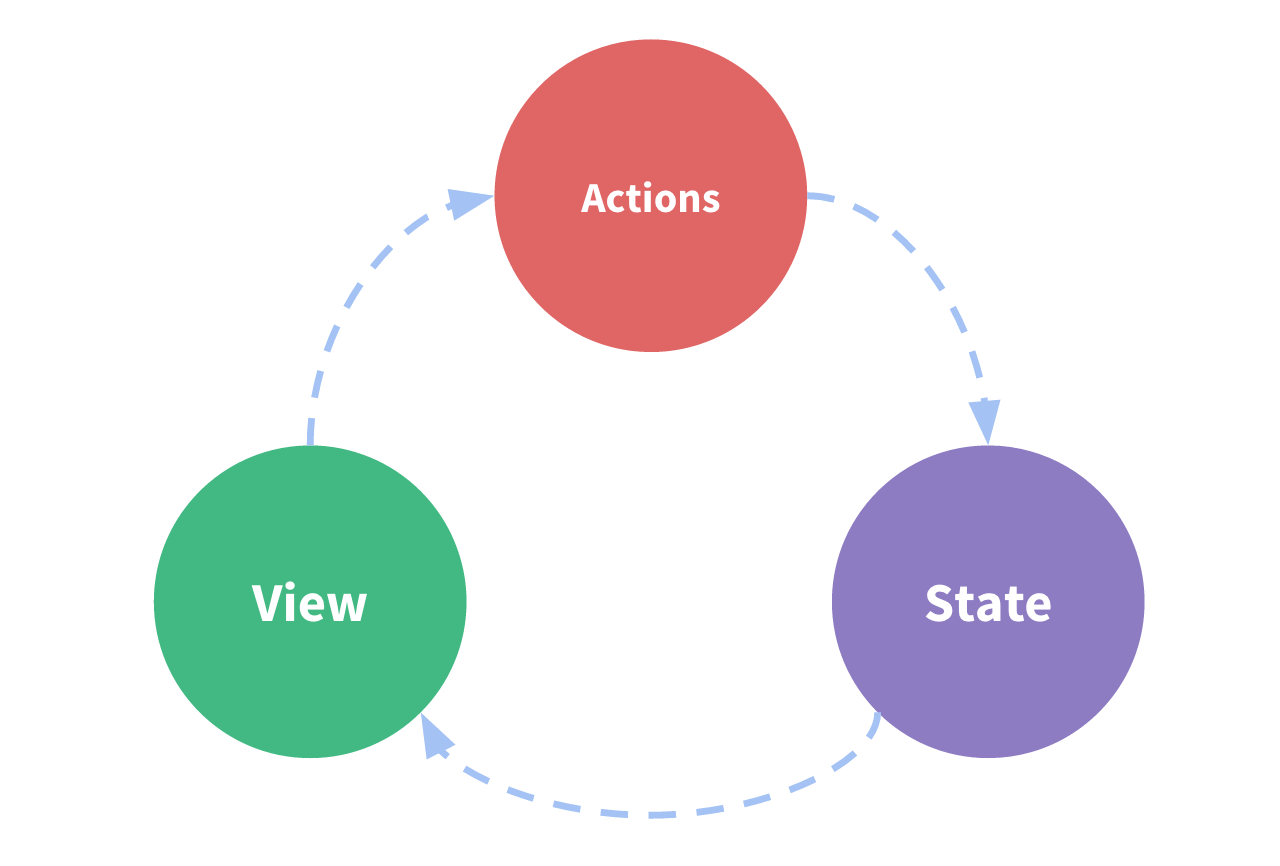
vue组件(其实不止是vue组件,我们开发的应用也是)由三部分组成: state/view/action

刚好映射vue组件的一个结构

1
2
3
4
5
6
7
8
9
10
11
12
13
14
15
16
new Vue({
// state
data () {
return {
count: 1
}
},
//view
template: `<div>{{count}}</div>`,
// action
methods: {
increment () {
this.count++
}
}
})

img

这个结构会出现什么问题呢?当action很多, 那么每个action如果都对state进行了修改。那么定位问题起来就会很复杂。

练习: 使用vue实例做微型状态管理

1
2
3
4
5
6
7
8
9
10
11
12
13
14
15
16
17
18
19
20
21
22
23
24
25
26
27
28
29
30
31
32
33
34
35
36
37
38
39
40
41
42
43
44
45
46
<div id="app">
<counter></counter>
<counter></counter>
<counter></counter>
<button @click="inc">increment</button>
</div>

<script>

// 这就相当于一个vuex的实例, 这对于一个中型应用很有帮助, 特别是接下来的卡片应用
const state = new Vue({
// Implement this!
data() {
// 这相当于vuex中的 store
return {
count: 0
}
},
methods: {
inc () {
// 这相当于vuex的mutation, 必须同步
this.count++
}
}
})

const counter = {
// Implement this!
render(h) {
return h('div', state.count)
},
}

new Vue({
el: '#app',
// Implement this!
components: {
counter
},
methods: {
inc () {
state.inc()
}
},
})
</script>

所以我们在action中调用API, 而在mutation中去修改store

练习: 自己写一个小型的vuex commit的功能

1
2
3
4
5
6
7
8
9
10
11
12
13
14
15
16
17
18
19
20
21
22
23
24
25
26
27
28
29
30
31
32
33
34
35
36
37
38
39
40
41
42
43
44
45
46
47
48
<div id="app">
<counter></counter>
<counter></counter>
<counter></counter>
<button @click="inc">increment</button>
</div>

<script>

function createStore ({ state, mutations }) {
// Implement this!
return new Vue({
data: {
state
},
methods: {
commit (mutationsType) {
mutations[mutationsType](this.state)
}
}
})
}

const store = createStore({
state: { count: 0 },
mutations: {
inc (state) {
state.count++
}
}
})

const Counter = {
render (h) {
return h('div', store.state.count)
}
}

new Vue({
el: '#app',
components: { Counter },
methods: {
inc () {
store.commit('inc')
}
}
})
</script>

练习:根据以下createApp实现vuex的action功能

1
2
3
4
5
6
7
8
9
10
11
12
13
14
15
16
17
18
19
20
21
22
23
24
25
26
27
28
29
30
31
32
33
34
35
36
37
38
39
40
41
42
43
44
45
46
47
<template>
<div id="app"></div>
</template>

<script>
function createApp ({ el, model, view, actions }) {
// Implement this!
const wrappedActions = {}

Object.keys(actions).map(key => {
const originalAction = actions[key]
wrappedActions[key] = () => {
const nextModel = originalAction(vm.model)
vm.model = nextModel
}
})

const vm = new Vue({
el: el,
data: {
model
},
render(h) {
return view(h, this.model, wrappedActions)
},
methods: {
},
})
}

// voila
createApp({
el: '#app',
model: {
count: 0
},
actions: {
inc: ({ count }) => ({ count: count + 1 }),
dec: ({ count }) => ({ count: count - 1 })
},
view: (h, model, actions) => h('div', { attrs: { id: 'app' }}, [
model.count, ' ',
h('button', { on: { click: actions.inc }}, '+'),
h('button', { on: { click: actions.dec }}, '-')
])
})
</script>
<1…567>

Hawei

Fullstack Engineer

61 posts
16 categories
3 tags
RSS
© 2022 Hawei
Powered by Hexo
|
Theme — NexT.Muse v5.1.4